

Seemannsgarn
Um Käpt'n Karl spinnen sich viele Legenden, nicht eine davon ist wahr. Die ganze Wahrheit wäre auch schlicht viel zu uninteressant. Deshalb spinnen wir hier am Seemannsgarn. Viel Spaß beim Lesen. Und ein Funken Wahrheit ist -wie immer- natürlich doch dabei.
Seemannsgarn
- Details
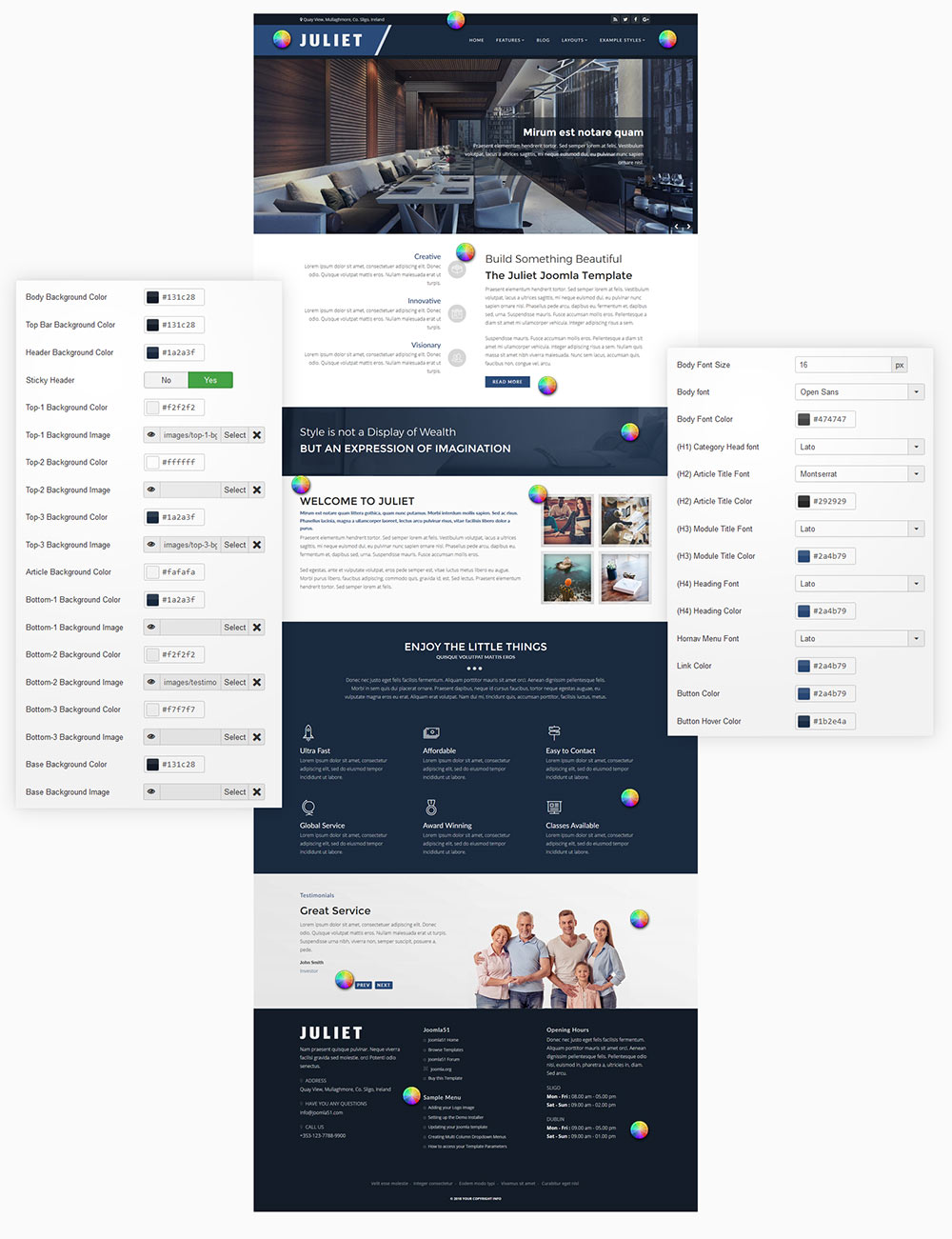
Your template comes with a host of Color Choosers allowing you total control of the look and feel of your site. Simply navigate to Extensions -> Template Manager -> [YourTemplate] to access the full range of easy to use Colour Choosers.
- Details
Heading1 (h1) looks like this
Lorem ipsum dolor sit amet, consectetuer adipiscing elit, sed diam nonummy nibh euismod tincidunt ut laoreet dolore magna aliquam erat volutpat. Ut wisi enim ad minim veniam, quis nostrud exerci tation ullamcorper suscipit lobortis nisl ut aliquip ex.
Heading2 (h2) looks like this
Lorem ipsum dolor sit amet, consectetuer adipiscing elit, sed diam nonummy nibh euismod tincidunt ut laoreet dolore magna aliquam erat volutpat. Ut wisi enim ad minim veniam, quis nostrud exerci tation ullamcorper suscipit lobortis nisl ut aliquip ex.
Heading3 (h3) looks like this
Lorem ipsum dolor sit amet, consectetuer adipiscing elit, sed diam nonummy nibh euismod tincidunt ut laoreet dolore magna aliquam erat volutpat. Ut wisi enim ad minim veniam, quis nostrud exerci tation ullamcorper suscipit lobortis nisl ut aliquip ex.
Heading4 (h4) looks like this
Lorem ipsum dolor sit amet, consectetuer adipiscing elit, sed diam nonummy nibh euismod tincidunt ut laoreet dolore magna aliquam erat volutpat. Ut wisi enim ad minim veniam, quis nostrud exerci tation ullamcorper suscipit lobortis nisl ut aliquip ex.
Heading5 (h5) looks like this
Lorem ipsum dolor sit amet, consectetuer adipiscing elit, sed diam nonummy nibh euismod tincidunt ut laoreet dolore magna aliquam erat volutpat. Ut wisi enim ad minim veniam, quis nostrud exerci tation ullamcorper suscipit lobortis nisl ut aliquip ex.
<pre> or <div class="code">
To display note use: <p class="note">Sample of your note !</p>
To display pin note use :<p class="pin">Sample of your pin note !</p>
To display clip note use:<p class="clip">Sample of your clip note</p>
To display download note use:<p class="down">Sample of your download note</p>
Text Formats
This is <strong>strong text</strong>
This is strong text
This is <em>emphasized text</em>
This is emphasized text
This is <u>underlined text</u>
This is underlined text
This is <s>strikethrough text</s>
This is strikethrough text
This is <a>link text</a>
This is link text
This is <small>small text</small>
This is small text
This is <sup>superscript text</sup>
This is superscript text
This is <sub>subscript text</sub>
This is subscript text
This is <samp>sample text</samp>
This is sample text
This is <var>variable text</var>
This is variable text
This is <kbd>keyboard text</kbd>
This is keyboard text
This is <abbr>abbreviation text</abbr>
This is abbreviation text
This is <del>deleted text</del>
This is deleted text
This is <ins>inserted text</ins>
This is inserted text
This is <mark>marked text</mark>
This is marked text
Ordered List
- Lorem ipsum dolor sit amet consectetur
- Lorem ipsum dolor sit amet consectetur
- Lorem ipsum dolor sit amet consectetur
Un-Ordered List
- Lorem ipsum dolor sit amet consectetur
- Lorem ipsum dolor sit amet consectetur
- Lorem ipsum dolor sit amet consectetur
Un-Ordered List witch class="tick"
<ul class="tick"><li>Your list item goes here!</li></ul>
- Lorem ipsum dolor sit amet consectetur
- Lorem ipsum dolor sit amet consectetur
- Lorem ipsum dolor sit amet consectetur
Un-Ordered List witch class="star"
<ul class="star"><li>Your list item goes here!</li></ul>
- Lorem ipsum dolor sit amet consectetur
- Lorem ipsum dolor sit amet consectetur
- Lorem ipsum dolor sit amet consectetur
Un-Ordered List witch class="plus"
<ul class="plus"><li>Your list item goes here!</li></ul>
- Lorem ipsum dolor sit amet consectetur
- Lorem ipsum dolor sit amet consectetur
- Lorem ipsum dolor sit amet consectetur
Horizontal Rules
<hr>
<hr class="center">
<hr class="right">
Blockquote
<blockquote><p>Your list item goes here!</p></blockquote>
Lorem ipsum dolor sit amet, consectetuer adipiscing elit, sed diam nonummy nibh euismod tincidunt ut laoreet dolore magna aliquam erat volutpat.
Emphasis Tags
<em class="highlight black">your text</em>
An emphasis tag that allows you to highlight some text in black.
<em class="highlight blue">your text</em>
An emphasis tag that allows you to highlight some text in blue.
<em class="highlight red">your text</em>
An emphasis tag that allows you to highlight some text in red.
<em class="highlight green">your text</em>
An emphasis tag that allows you to highlight some text in green.
<em class="highlight yellow">your text</em>
An emphasis tag that allows you to highlight some text in yellow.
Border Frames
<p class="border-frame"><img src="/images/yourimage.jpg"/></p>

Columns
<div class="columns-2"><p>Lorem ipsum dolor sit amet, consectetuer adipiscing elit. Phasellus hendrerit. Pellentesque aliquet nibh nec urna. In nisi neque, aliquet vel, dapibus id, mattis vel, nisi. Sed pretium, ligula sollicitudin laoreet viverra, tortor libero sodales leo, eget blandit nunc tortor eu nibh. Nullam mollis. Ut justo. Suspendisse potenti.Sed egestas, ante et vulputate volutpat, eros pede semper est, vitae luctus metus libero eu augue. Morbi purus libero, faucibus adipiscing, commodo quis, gravida id, est. Sed lectus. Praesent elementum hendrerit tortor. Sed semper lorem at felis. Vestibulum volutpat, lacus a ultrices sagittis, mi neque euismod dui, eu pulvinar nunc sapien ornare nisl. Phasellus pede arcu, dapibus eu, fermentum et, dapibus sed, urna.Morbi interdum mollis sapien.</p></div>
<div class="columns-3"><p>Lorem ipsum dolor sit amet, consectetuer adipiscing elit. Phasellus hendrerit. Pellentesque aliquet nibh nec urna. In nisi neque, aliquet vel, dapibus id, mattis vel, nisi. Sed pretium, ligula sollicitudin laoreet viverra, tortor libero sodales leo, eget blandit nunc tortor eu nibh. Nullam mollis. Ut justo. Suspendisse potenti.Sed egestas, ante et vulputate volutpat, eros pede semper est, vitae luctus metus libero eu augue. Morbi purus libero, faucibus adipiscing, commodo quis, gravida id, est. Sed lectus. Praesent elementum hendrerit tortor. Sed semper lorem at felis. Vestibulum volutpat, lacus a ultrices sagittis, mi neque euismod dui, eu pulvinar nunc sapien ornare nisl. Phasellus pede arcu, dapibus eu, fermentum et, dapibus sed, urna.Morbi interdum mollis sapien.</p></div>
<div class="columns-4"><p>Lorem ipsum dolor sit amet, consectetuer adipiscing elit. Phasellus hendrerit. Pellentesque aliquet nibh nec urna. In nisi neque, aliquet vel, dapibus id, mattis vel, nisi. Sed pretium, ligula sollicitudin laoreet viverra, tortor libero sodales leo, eget blandit nunc tortor eu nibh. Nullam mollis. Ut justo. Suspendisse potenti.Sed egestas, ante et vulputate volutpat, eros pede semper est, vitae luctus metus libero eu augue. Morbi purus libero, faucibus adipiscing, commodo quis, gravida id, est. Sed lectus. Praesent elementum hendrerit tortor. Sed semper lorem at felis. Vestibulum volutpat, lacus a ultrices sagittis, mi neque euismod dui, eu pulvinar nunc sapien ornare nisl. Phasellus pede arcu, dapibus eu, fermentum et, dapibus sed, urna.Morbi interdum mollis sapien.</p></div>
- Details
Die Landschaft, die Küste und die kleinen oder größeren Orte bieten vielfältige Aus- und Ansichten. Lasst Euch inspirieren.
- Details
Our ThumbsGallery module extension allows you to easily create a simple and stylish thumbs gallery module in to any module position on your site. A thumbs gallery is an excellent way to showcase your images in an elegant and space efficient manner.
To set up your Thumbs Gallery module simply point the module to the image folder of your choice and the module will do the rest. The module will automatically create thumbs for each of your images, linking them to the original image in a stylish, easy to navigate lightbox.
- Details
There is a total of 6 color styles available giving your the template flexibility in match the color scheme best suited to your needs. Color styles available are Black, Red, Blue, Green, Bronze and Purple and can be set by navigating to your templates parameters (Extensions -> Template Manager -> J51 [Template Name] and simply selecting the color style of your choice from the 'Template Style' dropdown menu.